Get Invitation of Demonoid Freely!

demonoid-logoDemonoid is a torrent-lovers first and best website and a world’s number one BitTorrent tracker created by an anonymous Serbian known only by the pseudonym "Deimos" and "Zajson". Demonoid offers lot of things which are really exclusive and hard to find except Demonoid. The domain name of Demonoid was previously http://www.demonoid.com but has been migrated since November 2010 to http://www.demonoid.me.

How to Register in Demonoid?

Registration opens in Demonoid from time to time for a very limited short period. However, a user can easily register at any time if he/she receives an invite from a current user.

Get Invitation for Demonoid Freely!

Are you interested for an account in Demonoid? Do you like to download latest exclusive materials freely? Then Demonoid is the perfect choice to select. I am a Demonoid user and I offer you the some invitation freely. I got some invitation code of my account which I would like to distribute you freely. Using these invitation code you can easily register yourself to the Demonoid website and you become a Demonoid users.

Change Logo in Joomla: How to Change Logo in Joomla Template?

Each website must have a unique attractive logo. When you installed Joomla for your website, you will find the default logo of Joomla. But you need to replace the default logo with your company or website logo. Changing logo in Joomla is simple and easy. This page explains in short the ways to change the logo of your Joomla website.

Steps to change logo in Joomla template:

Follow the following steps to change logo in Joomla template:
  1. Create a logo of your website using Photoshop or paint or any other photo editingsample logo software or program. For example, we create a logo myLogo.png and it looks like the followings. After creating the logo, upload the logo to the image directory of the template.
  2. Log in to your websites' admin control panel and access Extensions | Template Manager.

How to find the current default template of Joomla?

Current default template is the template which is the actual look and feel when the visitors visit the site. All websites build on Joomla CMS, has at least one current default template. Sometimes you may need to change the current default template or you may need to customize the template color, background or any other type of modifications. For all these purposes, you need to know the location of default template of your website. This page illustrates the way to find the default template of your Joomla website.

Steps to find the current default template of Joomla website:

  1. Log in to the Joomla!administration panel i.e. Joomla control panel from the address like www.example.com/administrator from any web browser where example is the name of a domain name. If your website name is HideMyTips then just replace the term example with the term HideMyTips.
  2. Once you have successfully logged in, navigate to the Template Manager feature under Extensions |Template Manager in the menu.
  3. There you will find the list of the templates and one template is marked with a yellow star symbol. And this is the default template of your Joomla website.
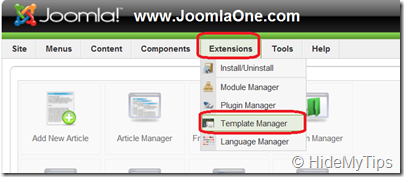
Finding Joomla Template ManagerThus following the above steps you can easily find out the default template of Joomla website. Moreover, if you click on the template name with the cursor, you may do lots of other things after accessing to that template.

For more illustration in details, you may visit the following link to learn step by steps visually to find the default location of Joomla template.

Learn visually to find the current default template of your Joomla website!!

How To Backup Blogger Template Design: Simple Steps to Backup Blogger Template


Summary of taking backup of Blogger blog template:

Publishing / creating contents and updating blog design is not the only daily activities of a blog owner. A blog owner must have to take the backup of his / her blog template before modifying any part of the template. Backing up regularly blogger templates, helps the blogger to restore the blog template if any mistake occurs during the template modification.

Common questions related to To backup Blogger template design:

  • How to backup blogger template?
  • how to backup blogger blog template?
  • How to backup blogspot blog template?
  • How to backup blogspot site template?
  • How to take backup blogger template design?

Hosting All the Template Images on Picasa

All the templates are designed with adding some images. It’s common that the blog owner normally don’t like to use the default template. Rather they use third party templates and moreover they like to customize the design. For customizing the templates, they need to add some images to the template and they need to host some image hosting service providers like Photobucket, Flickr, TinyPic etc. All the third party template provides generally use these type of image hosting solutions for hosting the images of the templates. But hosting solutions like those, generally not provide unlimited bandwidth and so after some days you will see that the templates do not look as earlier and somewhere you might be notice like “bandwidth exceed” or such type of texts or images. And so the best alternate solution is to use the Picasa as it offers unlimited bandwidth and so your template will always be as usual always.


Reasons to use Picasa for blogger template:

The main reasons of hosting template’s images to Picasa is:
  • Picasa offers unlimited bandwidth for all the images for your blogger template.

How To Add Signature or Blog Name in Blogger Posts?

Summary of adding signature or blog name in blog posts:

Blog owners like to make unique look and feel to their blogger / blogspot posts. To mitigate this desire, bloggers like to add a signature or the name of the blog at each of the blog posts. This post of HideMyTips simply explains the great tip and trick of adding a signature / blog name at the end of each posts.

Common questions related to add signature or blog name in blog posts:

  • How to add a signature to a blog posts?
  • How to add the signature of the writer(s) of any blogger blog?

Evergreen Melody - A Free Blogger Template for Any Blogger

Evergreen-Melody Evergreen Melody is a free customizable blog template for any blogger or blogspot blog owner. A green field is really attractive and everybody always like it. And so, Evergreen Melody is like a template of green color. Is it a natural place or anything else! No, it’s a template of green color to green your soul. Design this template for your only when you feel something like green and fresh. A fresh cool template, Evergreen melody is totally free of cost and perfect if you like green color. Just give a try and express your green thoughts. The basic color is attractive green but can be change all the colors and fonts.